Shopify Development: Your Essential Guide for Developers & Businesses [2026]
Master Shopify development: developer login, APIs, tools, themes & apps. Complete technical guide for building successful Shopify stores.
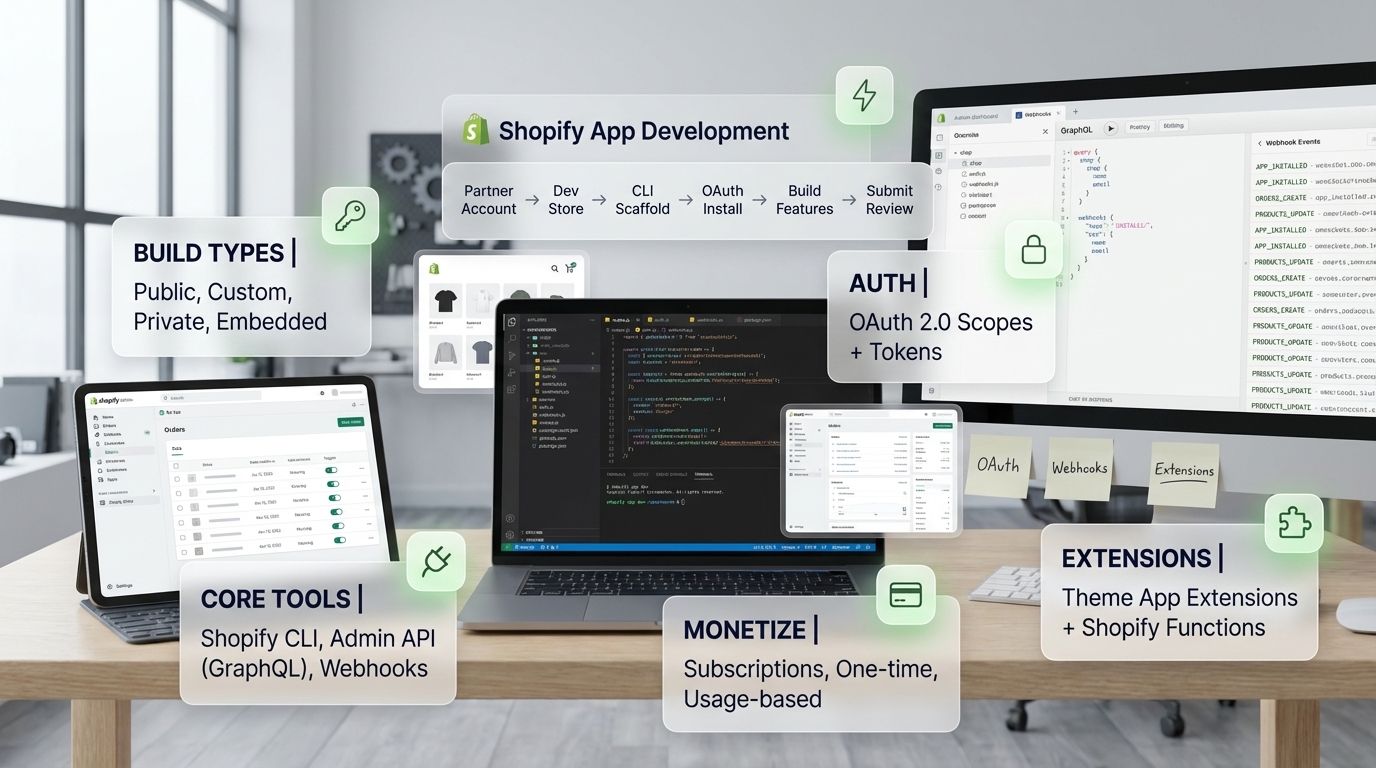
What is Shopify Development? (Quick Answer)
Shopify development is the process of building, customizing, and maintaining e-commerce stores on the Shopify platform. It involves creating custom themes, developing Shopify apps, integrating third-party services, and optimizing stores for performance.
A Shopify developer is a professional who specializes in building Shopify stores using technologies like Liquid templating, HTML, CSS, JavaScript, and Shopify’s APIs. Developers access tools through Shopify development login via Partner accounts.
Learn more about our Shopify development services and how we can help you build custom Shopify solutions. Need to choose a platform? Check our Shopify vs WooCommerce comparison. For specific services, visit our Shopify app development services page.
Fuentes y Recursos Externos
- Shopify Developer Documentation - Documentación oficial de Shopify para desarrolladores
- Shopify Partners - Programa oficial de partners de Shopify
What Does Shopify Developer Mean?
Understanding the Role
A Shopify developer is a professional who builds, customizes, and maintains e-commerce stores on the Shopify platform. The role encompasses various skills and responsibilities:
Shopify Developer Responsibilities
- Create custom themes and store designs
- Develop Shopify apps for the App Store
- Build custom functionality and integrations
- Optimize stores for performance and SEO
- Configure payment and shipping systems
- Migrate stores from other platforms to Shopify
- Provide ongoing maintenance and support
- Implement headless commerce solutions
- Customize checkout experiences
- Integrate third-party services and APIs
Skills Required
| Skill | Importance | Used For |
|---|---|---|
| Liquid Templating | Critical | Theme development |
| HTML/CSS | Critical | Store design and styling |
| JavaScript | High | Interactivity and functionality |
| Shopify APIs | High | Custom features and apps |
| Theme Development | High | Creating custom stores |
| App Development | Medium | Building Shopify apps |
| E-commerce Knowledge | High | Understanding online retail |
| Git/Version Control | Medium | Code management |
Shopify Development Login: Accessing Developer Tools
How to Access Shopify Development Tools
Shopify development login is accessed through the Shopify Partner program. Here’s how to get started:
-
Create Shopify Partner Account
Go to [partners.shopify.com](https://partners.shopify.com) and sign up for a free Partner account. Partner accounts are free and provide access to all development tools. You'll need an email address to register.
-
Verify Your Email
Check your email and verify your Partner account. Once verified, you can log in to the Partner Dashboard and start accessing development resources.
-
Log In to Partner Dashboard
Visit [partners.shopify.com](https://partners.shopify.com) and log in with your Partner credentials. The Partner Dashboard is your central hub for all development activities.
-
Access Development Stores
From the Partner Dashboard, create unlimited free development stores. These stores are perfect for testing, building themes, and developing apps. Development stores have all Shopify features except live payment processing.
-
Install Shopify CLI
Download and install [Shopify CLI](https://shopify.dev/docs/apps/tools/cli) for command-line development. Authenticate with your Partner account using `shopify auth login`. This connects your local development environment to Shopify.
-
Access Developer Resources
Use the Partner Dashboard to access: Developer documentation, API references, App development tools, Theme development resources, Testing tools, and Community forums.
Partner Dashboard Features
What You Can Do After Login
- Create unlimited development stores
- Manage apps you're developing
- Access Shopify CLI and development tools
- View API documentation and resources
- Test apps and themes
- Submit apps to Shopify App Store
- Track revenue from apps and referrals
- Access Partner community and support
How to Develop Shopify Sites
Development Process Overview
Shopify site development (développement de sites Shopify) follows a structured process:
-
Set Up Development Environment
Create a Shopify Partner account and log in. Set up Shopify CLI on your local machine. Create a development store from your Partner Dashboard. This gives you a safe environment to build and test.
-
Choose Development Approach
Decide: Custom theme development (build from scratch), Theme customization (modify existing theme), App development (create Shopify app), or Headless commerce (custom frontend with Storefront API). Choose based on project requirements.
-
Start Local Development
Use Shopify CLI: `shopify theme dev` for theme development, `shopify app dev` for app development. This creates a local development server with hot reload. Changes sync automatically to your development store.
-
Customize Theme
Edit Liquid templates, CSS, and JavaScript. Use the theme editor for visual changes, or code directly for advanced customization. Shopify CLI syncs changes to your dev store in real-time.
-
Add Functionality
Integrate apps, build custom features, connect third-party services. Use Shopify APIs (Admin API, Storefront API) for custom functionality. Test all features thoroughly in development store.
-
Test and Optimize
Test on multiple devices, check performance, validate SEO, test checkout flow, verify integrations. Use development store to test without affecting production. Fix issues before deployment.
-
Deploy to Production
Once tested, deploy to production store: Use `shopify theme push` to upload theme, Install required apps, Configure settings, Test again in production, Launch and monitor.
Development Workflow
| Stage | Tools Used | Activities |
|---|---|---|
| Setup | Partner Dashboard, Shopify CLI | Create account, setup environment |
| Development | Shopify CLI, Code Editor | Code themes/apps locally |
| Testing | Development Store, Browser DevTools | Test functionality |
| Deployment | Shopify CLI, Admin Dashboard | Push to production |
| Maintenance | Admin Dashboard, APIs | Updates and support |
Shopify Development Technologies
Core Technologies
Technologies Used in Shopify Development
- Liquid - Shopify's templating language (required for themes)
- HTML/CSS - Structure and styling
- JavaScript - Interactivity and dynamic features
- Shopify APIs - Admin API, Storefront API, Shopify Functions
- GraphQL - For API queries (flexible data fetching)
- React/Next.js - For headless commerce and apps
- Node.js - For app development and backend
- Git - Version control for code management
Development Tools
Summary: Essential Shopify Development Tools
| Tool | Purpose | Access Method |
|---|---|---|
| Shopify CLI | Command-line development | Download from shopify.dev |
| Partner Dashboard | Manage stores and apps | Login at partners.shopify.com |
| Theme Inspector | Debug themes | Browser extension |
| Shopify.dev Documentation | Learn and reference | shopify.dev |
| Development Stores | Testing environment | Partner Dashboard |
| Git | Version control | Install locally |
| Code Editor | Write code | VS Code, Sublime, etc. |
Pro tip: Start with Shopify Partner account and Shopify CLI. These are the foundation for all Shopify development work. Access documentation at shopify.dev for guides and API references.
Types of Shopify Development
1. Theme Development
Creating custom Shopify themes involves:
- Building with Liquid templates
- Styling with CSS
- Adding interactivity with JavaScript
- Customizing sections and templates
- Optimizing for performance
2. App Development
Building Shopify apps includes:
- Creating apps using Shopify CLI
- Using Admin API or Storefront API
- Implementing Shopify Functions
- Publishing to App Store
- Managing billing and subscriptions
3. Custom Development
Custom functionality includes:
- Unique features not in themes/apps
- Third-party integrations
- Custom checkout experiences
- Proprietary business logic
- Specialized workflows
4. Headless Commerce
Headless Shopify development:
- Custom frontend (React, Next.js, Vue)
- Storefront API integration
- Complete design freedom
- Multi-channel commerce
- Better performance
| Type | Complexity | Timeline | Best For |
|---|---|---|---|
| Theme Development | Medium | 2-8 weeks | Custom store design |
| App Development | High | 8-16 weeks | Unique features |
| Custom Development | High | 8-24 weeks | Specialized needs |
| Headless Commerce | Very High | 12-32 weeks | Enterprise, unique UX |
Learning Shopify Development
Getting Started
-
Learn the Basics
Start with HTML, CSS, and JavaScript fundamentals. These are essential for any web development, including Shopify. Understanding web development basics makes learning Shopify-specific technologies easier.
-
Create Partner Account
Sign up for a free [Shopify Partner account](https://partners.shopify.com). This gives you access to development tools, unlimited development stores, and all resources needed to learn.
-
Learn Liquid
Study [Liquid templating language](https://shopify.dev/docs/api/liquid) - Shopify's template language. Liquid is used in all theme development. Practice by customizing existing themes in development stores.
-
Practice with Development Stores
Create development stores and practice: Customize themes, Add custom code, Build simple features, Test different configurations. Development stores are free and unlimited - perfect for learning.
-
Study Shopify Documentation
Read [Shopify.dev documentation](https://shopify.dev) thoroughly. It covers themes, apps, APIs, and best practices. The documentation is comprehensive and regularly updated.
-
Build Real Projects
Build actual projects for practice or clients. Real projects teach you problem-solving and real-world challenges. Start small and gradually take on more complex projects.
-
Join the Community
Join [Shopify Community forums](https://community.shopify.com), follow Shopify developers on social media, attend webinars and workshops. Learning from others accelerates your growth.
Learning Resources
Recommended Resources
- [Shopify.dev](https://shopify.dev) - Official developer documentation
- [Shopify Partner Academy](https://partners.shopify.com) - Free courses and certifications
- [Shopify Community](https://community.shopify.com) - Developer forums
- [Liquid Documentation](https://shopify.dev/docs/api/liquid) - Template language reference
- [Shopify CLI Documentation](https://shopify.dev/docs/apps/tools/cli) - Development tools
- YouTube tutorials and courses
- Online coding bootcamps with Shopify focus
- Practice projects and templates
Shopify Development Best Practices
Development Guidelines
Best Practices
- Always use development stores for testing
- Use version control (Git) for all code
- Follow Shopify's theme development guidelines
- Optimize for performance (fast load times)
- Ensure mobile responsiveness
- Test thoroughly before deployment
- Document your code
- Keep Shopify CLI and tools updated
- Follow security best practices
- Use Shopify's recommended patterns and conventions
Common Mistakes to Avoid
Avoid These Mistakes
- Developing directly on production stores
- Not testing on mobile devices
- Ignoring performance optimization
- Not using version control
- Poor code organization
- Not following Shopify's coding standards
- Skipping documentation
- Not planning for scalability
Career Path: Becoming a Shopify Developer
Developer Career Progression
| Level | Skills Required | Typical Tasks | Salary Range |
|---|---|---|---|
| Junior Developer | HTML/CSS, basic Liquid | Theme customization, basic setup | $40K-$60K |
| Mid-Level Developer | Liquid, JavaScript, APIs | Custom themes, integrations | $60K-$90K |
| Senior Developer | Advanced APIs, apps, architecture | Complex development, leadership | $90K-$140K |
| Lead/Architect | Strategy, team management | Technical leadership, architecture | $120K-$180K+ |
Certification and Growth
Ways to Grow as Shopify Developer
- Complete Shopify Partner certifications
- Build portfolio of Shopify projects
- Contribute to open-source Shopify projects
- Publish apps to Shopify App Store
- Attend Shopify events and conferences
- Specialize in niche areas (Plus, headless, etc.)
- Mentor other developers
- Stay updated with Shopify updates and features
FAQ
Frequently asked questions
What is Shopify development?
Shopify development is the process of building, customizing, and maintaining e-commerce stores on the Shopify platform. It involves creating custom themes, developing Shopify apps, integrating third-party services, configuring store settings, and optimizing stores for performance and conversions. Shopify development uses technologies like Liquid (Shopify's templating language), HTML, CSS, JavaScript, and Shopify's APIs (Admin API, Storefront API, Shopify Functions). Developers can access development tools through Shopify Partner accounts and developer dashboards.
How do I access Shopify development login?
To access Shopify development tools, you need a Shopify Partner account. Steps: 1) Go to partners.shopify.com, 2) Sign up for a free Shopify Partner account, 3) Log in with your Partner credentials, 4) Access the Partner Dashboard, 5) Create development stores (unlimited free stores for testing), 6) Access Shopify CLI and development tools, 7) Use the Partner Dashboard to manage apps, themes, and stores. The Partner account gives you access to development resources, APIs, documentation, and tools needed for Shopify development. You can also log into individual Shopify stores you're developing through the store admin.
What does Shopify developer mean?
A Shopify developer is a professional who builds, customizes, and maintains e-commerce stores on the Shopify platform. Shopify developers: Create custom themes and store designs, Develop Shopify apps for the App Store, Build custom functionality and integrations, Optimize stores for performance and SEO, Configure payment and shipping systems, Migrate stores from other platforms, Provide ongoing maintenance and support. Shopify developers need skills in: Liquid templating, HTML/CSS/JavaScript, Shopify APIs (Admin API, Storefront API), Theme development, App development, and E-commerce best practices. Many Shopify developers are certified Shopify Partners.
How do I develop Shopify sites?
To develop Shopify sites: 1) Create a Shopify Partner account for development tools, 2) Set up a development store (free, unlimited stores), 3) Choose or create a theme (use Shopify CLI for local development), 4) Customize theme with Liquid, HTML, CSS, JavaScript, 5) Add products and configure store settings, 6) Integrate apps or develop custom functionality, 7) Test thoroughly on development store, 8) Deploy to production store, 9) Launch and monitor. Development workflow: Use Shopify CLI for local development, Access Partner Dashboard for store management, Use Theme Inspector for debugging, Leverage Shopify APIs for custom features, Follow Shopify's development best practices.
What tools do Shopify developers use?
Shopify developers use: Shopify CLI - Command-line tool for theme and app development, Shopify Partner Dashboard - Manage stores, apps, and access resources, Theme Inspector - Debug themes and analyze store structure, Liquid - Shopify's templating language for themes, Shopify APIs - Admin API, Storefront API, Shopify Functions, Development stores - Free stores for testing, Code editors (VS Code, Sublime Text) with Liquid extensions, Git - Version control for code, Shopify Theme Store - Access themes and templates, Shopify App Store - Publish and install apps, GraphQL - For API queries, Node.js - For app development, and Modern JavaScript frameworks for headless commerce.
Do I need coding skills for Shopify development?
Basic Shopify store setup doesn't require coding, but custom Shopify development requires coding skills. Essential skills: HTML/CSS for styling, JavaScript for interactivity, Liquid for Shopify templating, Basic understanding of APIs for integrations. Optional but valuable: React/Next.js for headless commerce, Node.js for app development, GraphQL for API queries, Git for version control. You can learn Shopify development through: Shopify's free documentation on shopify.dev, Shopify Partner Academy, Online courses and tutorials, Practice with development stores, Building real projects. Many successful Shopify developers are self-taught, learning through documentation and practice.
Conclusion
Shopify development encompasses building, customizing, and maintaining e-commerce stores on the Shopify platform. Understanding what Shopify developer means, how to access Shopify development login through Partner accounts, and the process of developing Shopify sites (développement de sites Shopify) is essential for anyone working with Shopify.
Key takeaways:
- Shopify developers build and customize e-commerce stores using Liquid, HTML, CSS, JavaScript, and Shopify APIs
- Shopify development login is accessed through free Shopify Partner accounts at partners.shopify.com
- Shopify site development involves creating themes, apps, and custom functionality
- Development tools include Shopify CLI, Partner Dashboard, and development stores
- Learning resources are available at shopify.dev and through the Partner Academy
- Development stores are free and unlimited for testing
- Shopify CLI enables local development with hot reload
- Career opportunities range from junior developers to technical architects
Our recommendation: Start by creating a free Shopify Partner account and exploring development stores. Learn Liquid templating through Shopify.dev documentation, practice with development stores, and build real projects. The Shopify development ecosystem is well-documented and supportive, making it accessible for developers of all levels.
Ready to start your Shopify development journey? Create a Partner account, access development tools, and start building amazing e-commerce experiences.