Shopify App Development: Complete Guide 2026 - Create, Build & Develop Apps
Complete guide to Shopify app development: how to create Shopify apps, build plugins, develop applications from scratch, process, tools, APIs, and step-by-step instructions for building your first app.
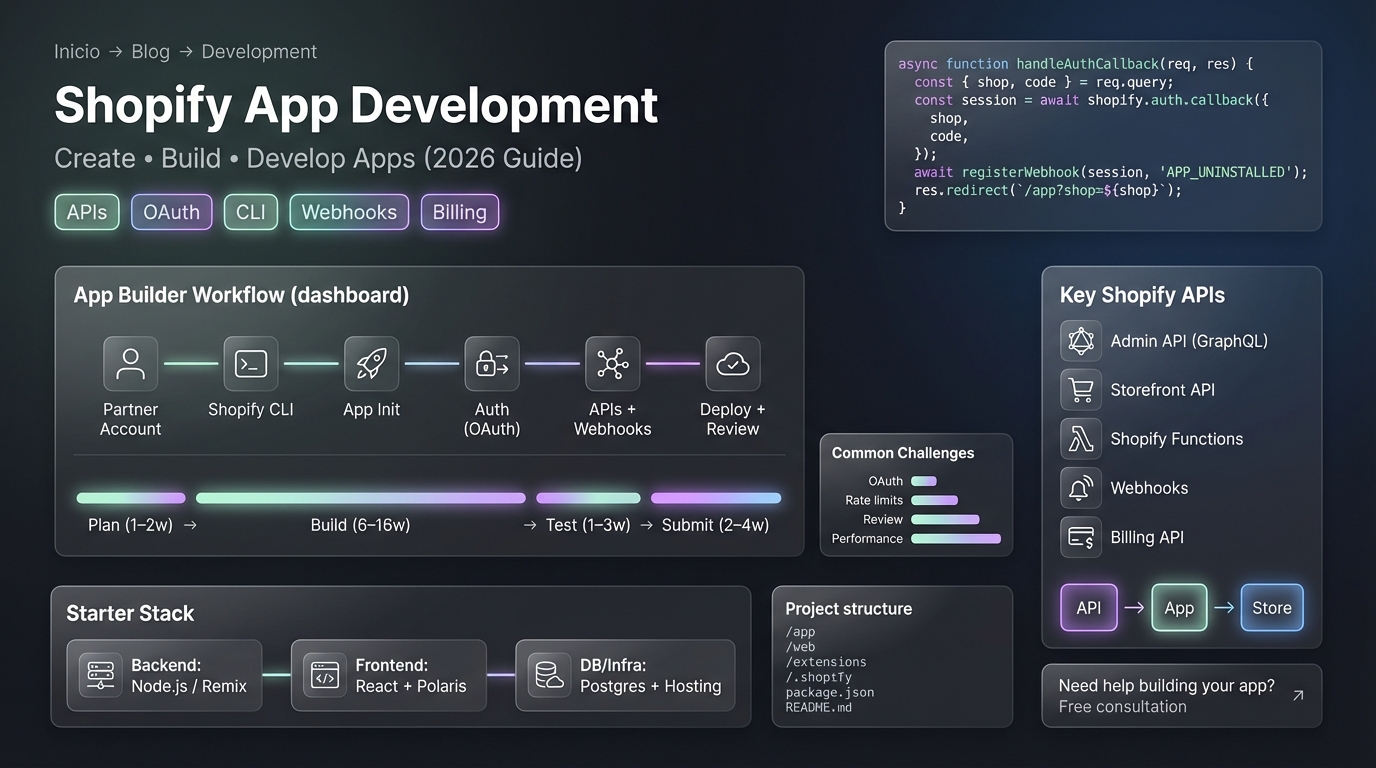
What is Shopify App Development? (Quick Answer)
Shopify app development is the process of creating custom applications that extend Shopify store functionality. These apps integrate with Shopify stores via APIs to add features like product recommendations, email marketing, inventory management, and more.
Shopify application development (the same concept) involves building apps that merchants can install from the Shopify App Store or use privately. To create a Shopify app, you need a Shopify Partner account, development tools, and knowledge of Shopify APIs.
Learn more about our Shopify development services and how we can help you build custom Shopify apps. For specific services, visit our Shopify app development services page.
Fuentes y Recursos Externos
- Shopify Developer Documentation - Documentación oficial de Shopify para desarrolladores
- Shopify Partners - Programa oficial de partners de Shopify
Understanding Shopify App Development
What Apps Do
Shopify apps extend store functionality by:
Common App Functions
- Add new features not available in core Shopify
- Integrate with third-party services (email, CRM, accounting)
- Enhance existing features (advanced product options, checkout)
- Automate tasks and workflows
- Provide analytics and reporting
- Improve marketing and conversion
- Manage inventory and orders
- Enhance customer experience
Types of Shopify Apps
| App Type | Description | Use Case |
|---|---|---|
| Public Apps | Published to App Store, available to all merchants | Reach wide audience |
| Private Apps | Built for specific stores, not in App Store | Custom solutions |
| Custom Apps | Enterprise apps for specific businesses | Large businesses |
| Embedded Apps | Integrated directly into Shopify admin | Seamless UX |
How to Create a Shopify App: Step-by-Step
Prerequisites
Before you build a Shopify app, you need:
What You Need
- [Shopify Partner account](https://partners.shopify.com) - Free to create
- [Shopify CLI](https://shopify.dev/docs/apps/tools/cli) - Development tool
- Node.js v18+ (if using Node.js stack)
- Code editor (VS Code recommended)
- Git for version control
- Understanding of JavaScript/TypeScript
- Knowledge of web development basics
Step-by-Step: Create Shopify App
-
Create Shopify Partner Account
Go to [partners.shopify.com](https://partners.shopify.com) and sign up for a free Partner account. This gives you access to development tools, unlimited development stores, and the ability to publish apps. Verify your email address to activate the account.
-
Install Shopify CLI
Install [Shopify CLI](https://shopify.dev/docs/apps/tools/cli) globally: `npm install -g @shopify/cli @shopify/app`. Verify installation with `shopify version`. The CLI provides commands to create, develop, and deploy apps.
-
Authenticate with Partner Account
Run `shopify auth login` in your terminal. This opens your browser to authenticate with your Partner account. The CLI stores your credentials for future use. You'll need to authenticate once.
-
Create New App Project
Run `shopify app init` in your terminal. The CLI asks: App name, Preferred package manager (npm/yarn), Template (Node.js, PHP, or Ruby), Frontend framework (React recommended). This creates a scaffolded app with all necessary files.
-
Set Up Development Store
Create a development store from your Partner Dashboard. This is a free test store where you'll develop and test your app. You can create unlimited development stores. The app connects to this store for testing.
-
Start Development Server
Navigate to your app directory and run `shopify app dev`. This starts the development server, creates a tunnel for local development, and connects your app to your development store. Your app URL opens automatically.
-
Develop App Functionality
Build your app features: Use Shopify APIs (Admin API, Storefront API) to interact with store data, Build admin interface for merchants, Create user-facing features if needed, Implement authentication and security, Add database for app data storage.
-
Test Your App
Test all functionality in your development store: Install app and test features, Test API integrations, Check error handling, Test on different devices, Verify security and permissions. Fix any bugs before submission.
-
Prepare for App Store Submission
Prepare app listing: Write app description, Create screenshots and app icon, Set pricing and plans, Write privacy policy, Create user documentation, Test thoroughly one more time, Ensure compliance with App Store guidelines.
-
Submit to App Store
Submit app through Partner Dashboard: Fill out app listing details, Upload app code, Submit for Shopify review (typically takes 2-4 weeks), Address any feedback from reviewers, Once approved, your app is live in the App Store.
Shopify Application Development Process
Development Workflow
Shopify application development follows this workflow:
| Phase | Activities | Duration |
|---|---|---|
| Planning | Define features, architecture, APIs needed | 1-2 weeks |
| Design | UI/UX design, wireframes, database design | 2-3 weeks |
| Development | Build features, integrate APIs, implement logic | 6-16 weeks |
| Testing | Unit tests, integration tests, QA | 1-3 weeks |
| Submission | Prepare listing, submit to App Store | 1 week |
| Review | Shopify reviews app, address feedback | 2-4 weeks |
| Launch | App goes live, monitor, gather feedback | Ongoing |
Shopify Plugin Development Explained
Apps vs Plugins
Important Note: Shopify uses apps, not traditional “plugins”. However, Shopify plugin development is often used interchangeably with app development. Here’s the distinction:
Understanding the Terminology
- Shopify Apps - Full applications that integrate via APIs
- Plugins - More commonly used for WordPress, Joomla
- Shopify 'plugins' - Usually refers to Shopify apps
- Development process is the same regardless of term used
For Shopify development, you build apps (not plugins). The process involves:
- Creating applications that integrate with Shopify
- Using Shopify APIs for functionality
- Publishing to App Store (for public apps)
- Same development approach whether called “app” or “plugin”
Technologies and Tools for App Development
Tech Stack Options
Summary: Shopify App Development Tech Stack
| Component | Technology Options | Recommendation |
|---|---|---|
| Backend | Node.js, Ruby, PHP | Node.js (most popular) |
| Frontend | React, Vue, Plain HTML/CSS/JS | React (recommended) |
| Database | PostgreSQL, MySQL, MongoDB | PostgreSQL |
| Hosting | Heroku, AWS, Google Cloud, Railway | Heroku or Railway |
| APIs | Shopify Admin API, Storefront API | Required |
| CLI | Shopify CLI | Required |
| Version Control | Git (GitHub, GitLab) | Required |
Pro tip: Shopify CLI provides templates for Node.js, Ruby, and PHP. Node.js is most popular and has best documentation. React is recommended for frontend interfaces. Use Shopify's recommended stack for easiest development experience.
Essential Development Tools
Required Tools
- [Shopify CLI](https://shopify.dev/docs/apps/tools/cli) - Create, develop, deploy apps
- [Shopify Partner Dashboard](https://partners.shopify.com) - Manage apps and stores
- [Shopify.dev Documentation](https://shopify.dev) - Complete API and development guides
- Code Editor (VS Code with Shopify extensions)
- Git - Version control
- Postman or Insomnia - API testing
- Browser DevTools - Debugging
Shopify APIs for App Development
Key APIs You’ll Use
Shopify APIs
- Admin API - Manage products, orders, customers, inventory (GraphQL or REST)
- Storefront API - Access storefront data, create custom buying experiences
- Shopify Functions - Customize checkout and delivery logic
- Webhooks - Real-time notifications when events occur
- Billing API - Handle subscriptions and one-time charges for paid apps
- Customer Account API - Manage customer accounts and authentication
API Authentication
Shopify apps use OAuth 2.0 for authentication:
-
Register App
Register your app in Partner Dashboard. Shopify provides Client ID and Client Secret for OAuth.
-
OAuth Flow
Redirect merchant to Shopify for authorization. Merchant approves app permissions. Shopify redirects back with authorization code.
-
Exchange for Access Token
Exchange authorization code for access token. Use access token for API requests. Tokens can be stored for future requests.
-
Make API Requests
Include access token in API requests. Token grants permissions based on scopes requested. Refresh token if expired.
Building Your First Shopify App
Quick Start Guide
To build a Shopify app quickly:
Quick Start Steps
- Install Shopify CLI: `npm install -g @shopify/cli @shopify/app`
- Create Partner account at partners.shopify.com
- Authenticate: `shopify auth login`
- Create app: `shopify app init`
- Start dev server: `shopify app dev`
- Start coding in the generated project
- Follow Shopify CLI prompts and documentation
App Structure
A typical Shopify app has this structure:
your-app/
├── app/                  # Admin interface (React/Polaris)
├── web/                  # Backend (Node.js/Express)
├── extensions/           # Shopify Functions, theme extensions
├── .shopify/            # Shopify CLI configuration
├── package.json         # Dependencies
└── README.md           # Documentation
Development Best Practices
Coding Best Practices
Development Best Practices
- Follow Shopify's app development guidelines
- Use Shopify CLI for all development tasks
- Test thoroughly in development store before submission
- Implement proper error handling
- Use environment variables for sensitive data
- Follow REST/GraphQL API best practices
- Implement rate limiting for API calls
- Use version control (Git) for all code
- Document your code and APIs
- Optimize app performance
Security Best Practices
Security Requirements
- Always use HTTPS for app URLs
- Validate and sanitize all user input
- Store sensitive data securely (encrypted)
- Implement proper OAuth flow
- Request only necessary API scopes
- Handle API rate limits gracefully
- Keep dependencies updated (security patches)
- Follow OWASP security guidelines
App Store Submission
Preparing for Submission
-
Review App Store Requirements
Read [Shopify App Store requirements](https://help.shopify.com/en/partners/app-store-requirements) carefully. Ensure your app meets all guidelines: Functionality, Security, Privacy, Performance, User experience.
-
Prepare App Listing
Write compelling description, create high-quality screenshots (multiple), design professional app icon, write privacy policy, set pricing (free, one-time, subscription), create support documentation.
-
Test Thoroughly
Test all features, test on different devices, verify security, check performance, test error scenarios, verify API integrations work correctly. Fix any issues before submission.
-
Submit Application
Go to Partner Dashboard > Apps > Submit for review. Fill out all required information, upload app code, provide app listing details, answer all questions, and submit.
-
Respond to Feedback
Shopify reviews typically take 2-4 weeks. Respond to any feedback promptly, make required changes, test after changes, and resubmit if needed. Most apps require at least one revision.
App Store Review Process
| Stage | Duration | What Happens |
|---|---|---|
| Initial Review | 1-2 weeks | Shopify checks compliance |
| Testing | 1 week | Reviewers test functionality |
| Feedback | 3-5 days | Feedback provided if needed |
| Revision | 1-2 weeks | You make changes |
| Re-review | 1 week | Shopify reviews changes |
| Approval | Immediate | App goes live |
Common Development Challenges
Challenges and Solutions
| Challenge | Solution | Prevention |
|---|---|---|
| OAuth authentication issues | Follow Shopify OAuth docs exactly | Test auth flow early |
| API rate limits | Implement rate limiting and caching | Plan API usage |
| App Store rejection | Follow guidelines, test thoroughly | Review requirements before submission |
| Performance issues | Optimize API calls, cache data | Monitor performance during development |
| Scope creep | Define scope clearly upfront | Stick to MVP first |
Monetization Strategies
How Apps Make Money
Monetization Options
- Free - Build user base, monetize later
- One-time charge - Pay once, use forever
- Subscription - Recurring monthly/yearly payments
- Usage-based - Charge per action/transaction
- Freemium - Free tier + paid premium features
- Commission - Percentage of sales
Implementing Billing
Shopify provides Billing API for handling payments:
Billing Implementation
- Use Shopify Billing API for subscriptions
- Set up one-time charges for features
- Handle trial periods
- Implement usage-based billing
- Handle cancellations and refunds
FAQ
Frequently asked questions
What is Shopify app development?
Shopify app development is the process of creating custom applications that extend Shopify store functionality. Apps can add features like product recommendations, email marketing, inventory management, customer loyalty programs, and more. Shopify app development uses technologies like Node.js, Ruby, or PHP for backend, React or other frameworks for frontend, and integrates with Shopify APIs (Admin API, Storefront API, Shopify Functions). Apps are published to the Shopify App Store where merchants can install them. Development requires a Shopify Partner account, understanding of Shopify APIs, and knowledge of web development technologies.
How do I create a Shopify app?
To create a Shopify app: 1) Sign up for a free Shopify Partner account at partners.shopify.com, 2) Install Shopify CLI on your machine, 3) Run `shopify app init` to create a new app project, 4) Choose your tech stack (Node.js, Ruby, or PHP), 5) Set up your development environment, 6) Develop your app functionality using Shopify APIs, 7) Test your app in a development store, 8) Submit to Shopify App Store for review, 9) Once approved, your app is available for merchants to install. The Shopify CLI simplifies the setup process and provides templates to get started quickly. Apps can be built for internal use or published publicly in the App Store.
What is Shopify application development?
Shopify application development (same as Shopify app development) involves building applications that integrate with Shopify stores to add functionality. Applications can be: Public apps (published to App Store), Private apps (for specific stores), Custom apps (for enterprise stores), or Embedded apps (integrated into Shopify admin). Development includes: Backend development (server-side logic), Frontend development (admin interface), API integration with Shopify, Database setup for app data, Authentication and security, Billing implementation for paid apps, Testing and quality assurance, and App Store submission. Applications enhance store functionality and help merchants run their businesses more effectively.
What is Shopify plugin development?
Shopify doesn't use traditional 'plugins' - instead, it uses 'apps' that integrate via APIs. However, 'Shopify plugin development' often refers to Shopify app development. Some developers use 'plugin' and 'app' interchangeably, but technically: Shopify Apps are full applications that integrate with stores, while plugins are more commonly associated with WordPress. For Shopify, you develop apps (not plugins) that merchants install from the App Store or use privately. The development process is the same whether you call it app or plugin development - building applications that extend Shopify functionality.
What tools do I need to build a Shopify app?
To build a Shopify app, you need: Shopify Partner account (free at partners.shopify.com), Shopify CLI (command-line tool for development), Node.js, Ruby, or PHP (depending on your backend choice), Code editor (VS Code, Sublime Text), Git for version control, Development store (free with Partner account), Knowledge of Shopify APIs (Admin API, Storefront API), Frontend framework (React recommended), Database (PostgreSQL, MySQL, or MongoDB), Hosting (Heroku, AWS, Google Cloud), and Understanding of OAuth for authentication. The Shopify CLI (`npm install -g @shopify/cli @shopify/app`) provides templates and tools to get started quickly.
How long does it take to develop a Shopify app?
Shopify app development timelines: Simple app (basic features): 8-12 weeks, Medium complexity app: 12-20 weeks, Complex app (advanced features): 20-32 weeks, Enterprise app: 32-48+ weeks. Timeline includes: Planning and design (1-3 weeks), Development (6-16 weeks), Testing and QA (1-3 weeks), App Store submission and review (2-4 weeks). Factors affecting timeline: App complexity and features, Developer experience, Integration requirements, Testing scope, Revision cycles, and App Store review feedback. Starting with MVP (Minimum Viable Product) can reduce initial timeline to 6-8 weeks, then iterate based on feedback.
Conclusion
Shopify app development allows you to create custom applications that extend Shopify store functionality. Whether you want to create a Shopify app, build a Shopify app, or understand Shopify application development and Shopify plugin development, the process follows similar principles.
Key takeaways:
- Shopify app development requires a Partner account, Shopify CLI, and knowledge of APIs
- Create Shopify apps using
shopify app initand develop with Shopify CLI - Shopify application development follows a structured process from planning to App Store
- Shopify plugin development is the same as app development (Shopify uses apps, not plugins)
- Build Shopify apps using Node.js, Ruby, or PHP with React frontend
- Development timeline is 8-32+ weeks depending on complexity
- App Store submission takes 2-4 weeks for review
- Shopify provides excellent tools and documentation to get started
Our recommendation: Start by creating a free Shopify Partner account and installing Shopify CLI. Use shopify app init to scaffold your first app and follow the Shopify.dev documentation for detailed guides. Start with a simple MVP, test thoroughly, and iterate based on feedback. The Shopify development ecosystem is well-documented and developer-friendly.
Ready to build your Shopify app? Follow the steps above, leverage Shopify’s tools and documentation, and start creating apps that help merchants succeed.