AI Medical Software Demo: Complete Guide 2026 - Examples, Features & How to Choose
Complete guide to AI medical software demos: examples, key features, how to evaluate demos, benefits of AI in healthcare, and choosing the right AI-powered medical software for your practice.
What is AI Medical Software? (Quick Answer)
AI medical software uses artificial intelligence and machine learning to assist healthcare professionals with tasks like patient scheduling, clinical documentation, diagnosis assistance, treatment recommendations, and administrative automation. These solutions help reduce administrative burden, improve diagnostic accuracy, and enhance patient outcomes.
When evaluating AI medical software demos, look for ease of use, AI capabilities relevant to your specialty, HIPAA compliance, integration options, and how well it fits your practice workflow.
If you need custom healthcare software development, learn more about our desarrollo de software a medida services. Check out our servicios de desarrollo de software a medida for AI-powered medical solutions.
Understanding AI Medical Software
What AI Medical Software Does
Key AI Capabilities in Medical Software
- Automated appointment scheduling and optimization
- Medical image analysis (X-rays, MRIs, CT scans)
- Clinical decision support and diagnosis assistance
- Voice-to-text documentation and smart templates
- Patient risk stratification and outcome prediction
- Drug interaction checking and medication management
- Administrative task automation
- Personalized treatment recommendations
- Pattern recognition in patient data
- Telemedicine and virtual care support
Benefits of AI in Healthcare
| Benefit | Impact | Example Use Case |
|---|---|---|
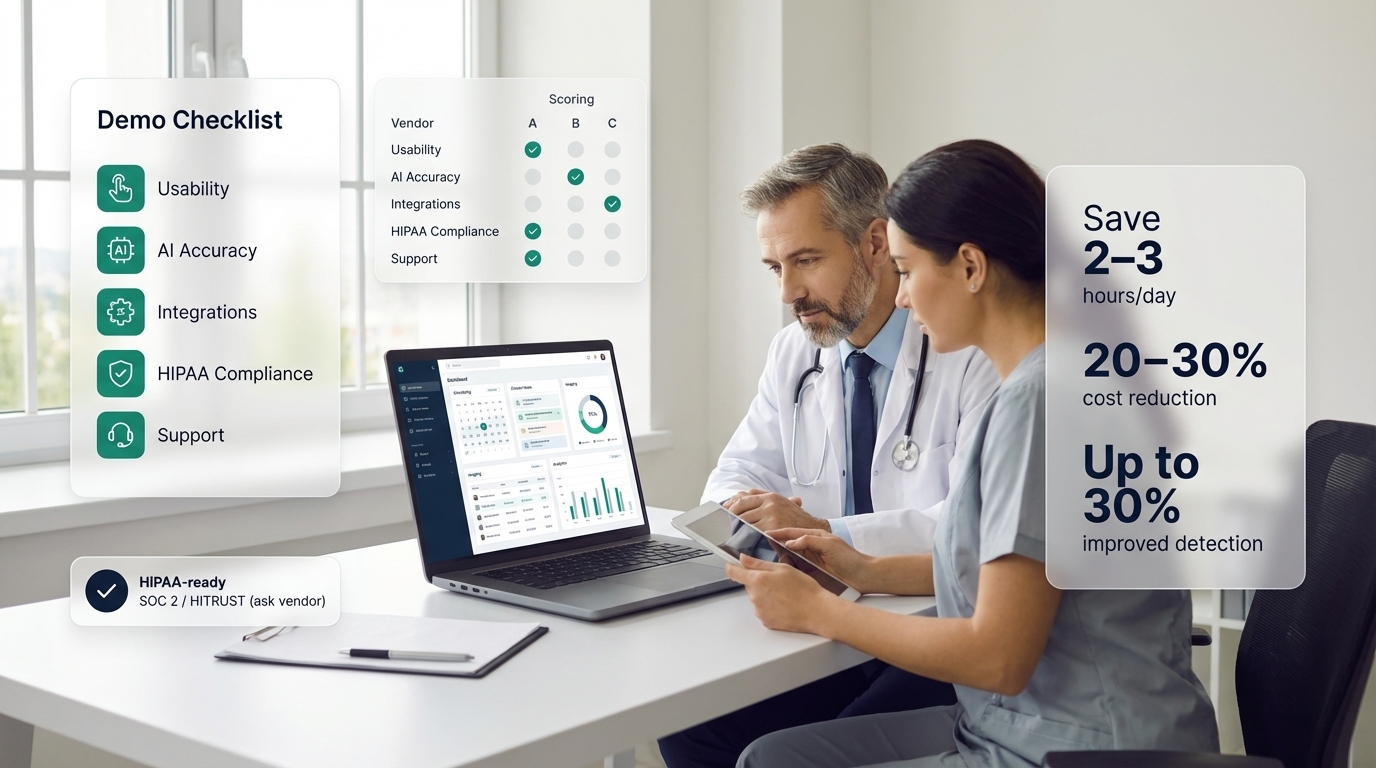
| Reduced Administrative Time | Save 2-3 hours daily | Automated documentation |
| Improved Diagnostic Accuracy | Up to 30% better detection | Medical imaging analysis |
| Better Patient Outcomes | Fewer errors, faster treatment | Risk prediction |
| Cost Savings | Reduce operational costs 20-30% | Efficient scheduling |
| Enhanced Efficiency | See more patients per day | Workflow optimization |
| Data-Driven Insights | Identify trends and patterns | Population health analytics |
Types of AI Medical Software
1. Appointment Scheduling & Practice Management
AI-powered scheduling software optimizes appointment booking, reduces no-shows, and improves patient flow. These systems can:
- Automatically optimize appointment slots
- Send intelligent reminders
- Predict no-shows and suggest alternatives
- Manage multiple providers and locations
- Integrate with calendars and EHR systems
Example: OnTheDot (onthedot.cl) is an AI-powered appointment scheduling platform that works for medical practices. Note: OnTheDot is a comprehensive scheduling solution that serves various industries, not just healthcare. It demonstrates how modern AI scheduling platforms can benefit medical practices with intelligent booking, automated reminders, and calendar management - but it’s designed as a broader appointment booking tool that medical practices can adapt to their needs.
2. Diagnostic Imaging Software
AI diagnostic tools analyze medical images to detect abnormalities:
- X-ray interpretation
- MRI and CT scan analysis
- Pathology image analysis
- Dermatology image recognition
- Early disease detection
3. Clinical Decision Support Systems
AI clinical tools assist with diagnosis and treatment:
- Symptom analysis and diagnosis suggestions
- Treatment protocol recommendations
- Drug interaction checking
- Clinical guideline adherence
- Risk assessment tools
4. EHR with AI Documentation
AI-enhanced EHR systems streamline documentation:
- Voice-to-text transcription
- Smart templates and auto-population
- Clinical note generation
- Coding assistance
- Data extraction and structuring
Summary: Types of AI Medical Software
| Type | Primary Function | Cost Range | Best For |
|---|---|---|---|
| Scheduling/Booking | Appointment management | $50-$200/mo | All practices |
| Diagnostic Imaging | Image analysis | $500-$2K+/mo | Radiology, imaging centers |
| Clinical Decision Support | Diagnosis assistance | $200-$1K/mo | Primary care, specialists |
| AI-Enhanced EHR | Documentation automation | $300-$800/mo | All practices |
| Telemedicine Platform | Virtual care | $100-$500/mo | Primary care, specialists |
Pro tip: Start with scheduling or EHR AI features if you're new to AI medical software. These provide immediate time savings and are easier to implement than specialized diagnostic tools.
Evaluating AI Medical Software Demos
What to Look for in a Demo
-
Request a Personalized Demo
Ask for a demo tailored to your practice type, specialty, and specific needs. Generic demos may not show how the software works for your workflow. Bring examples of your current challenges.
-
Test Key Workflows
During the demo, test workflows you use daily: scheduling appointments, documenting patient visits, reviewing test results, generating reports. See how AI enhances these processes.
-
Evaluate AI Capabilities
Ask specific questions: How does the AI learn and improve? What data does it analyze? How accurate are AI suggestions? Can you customize AI recommendations? Understand the AI's limitations.
-
Check Integration Options
Verify integrations with your existing systems: EHR, billing software, lab systems, imaging platforms. Ask about API availability and custom integrations. Integration is critical for workflow.
-
Assess Security & Compliance
Confirm HIPAA compliance, data encryption, access controls, audit logs, and Business Associate Agreements (BAA). Request documentation. Security is non-negotiable in healthcare.
-
Evaluate Usability
Test the interface yourself during demo. Is it intuitive? How much training is needed? Can staff learn it quickly? Usability affects adoption and efficiency.
-
Ask About Support & Training
Inquire about onboarding, training resources, ongoing support, update frequency, and response times. Good support is essential for successful implementation.
Demo Checklist
Essential Demo Questions
- How does the AI work? (transparency about algorithms)
- What data does it need to function effectively?
- How accurate are AI predictions/recommendations?
- Can AI suggestions be overridden by clinicians?
- How does it integrate with our current systems?
- What's the implementation timeline and process?
- How much training is required for staff?
- What's the total cost (including setup, training, ongoing)?
- Can we get references from similar practices?
- What happens to our data if we switch vendors?
AI Medical Software Example: OnTheDot
Scheduling Platform Overview
OnTheDot is an AI-powered appointment scheduling platform that demonstrates how modern scheduling technology can benefit medical practices. Important Note: OnTheDot is a comprehensive scheduling solution designed for various industries, including healthcare, beauty services, consulting, and more. It’s not exclusively medical software - it’s a flexible appointment booking platform that medical practices can use effectively.
Key Features for Medical Practices
Features Relevant to Healthcare
- AI-optimized appointment scheduling
- Automated patient reminders
- Calendar management and synchronization
- Multi-provider and multi-location support
- Customizable booking flows
- Patient self-service booking
- Integration capabilities with other systems
Why This Example Matters
OnTheDot serves as a good example of how AI scheduling technology works, but it’s important to understand:
- It’s a general scheduling platform, not specialized medical software
- Medical practices need additional features beyond scheduling (EHR, billing, clinical notes)
- Evaluate if it fits your needs - it may work well for smaller practices focused on appointment management
- For comprehensive medical practice management, you’ll likely need additional software for clinical documentation, billing, and EHR
This example illustrates that AI scheduling is just one component of medical practice software needs. Many practices use multiple specialized tools - scheduling software like OnTheDot might work alongside dedicated EHR systems.
When to Consider Broader Platforms
Consider Broader Platforms If:
- You primarily need scheduling and appointment management
- You already have separate EHR and billing systems
- You want cost-effective solutions for specific functions
- You prefer best-in-class tools over all-in-one solutions
Key Features to Evaluate in Demos
Essential Features
| Feature | Importance | What to Look For |
|---|---|---|
| HIPAA Compliance | Critical | BAA, encryption, audit logs |
| EHR Integration | High | API access, common integrations |
| Mobile Access | High | iOS/Android apps, responsive design |
| AI Transparency | High | Explainable AI, override options |
| Customization | Medium | Workflow adaptation, templates |
| Reporting & Analytics | Medium | Custom reports, dashboards |
| Support & Training | High | Onboarding, ongoing support |
| Scalability | Medium | Multi-provider, multi-location |
AI-Specific Features
AI Capabilities to Evaluate
- How AI improves over time (machine learning)
- Accuracy metrics and validation studies
- Ability to customize AI behavior
- Transparency in AI decision-making
- Human oversight and override capabilities
- Data privacy in AI processing
- Bias detection and mitigation
Security & HIPAA Compliance
Compliance Requirements
HIPAA compliance is mandatory for any software handling protected health information (PHI):
HIPAA Compliance Checklist
- Signed Business Associate Agreement (BAA)
- Encryption of data in transit (TLS/SSL)
- Encryption of data at rest
- Access controls and user authentication
- Audit logs for all PHI access
- Regular security assessments
- Data breach notification procedures
- Staff training on HIPAA compliance
- Physical and technical safeguards
- Data backup and recovery procedures
Questions to Ask About Security
Security Questions for Demo
- Can you provide HIPAA compliance documentation?
- Where is data stored? (geographic location)
- Who has access to patient data?
- How is data encrypted?
- What happens in case of a security breach?
- How often are security audits performed?
- Is the software certified (SOC 2, HITRUST)?
Cost Considerations
Pricing Models
| Model | Typical Cost | Best For |
|---|---|---|
| Per Provider/Month | $100-$500/mo | Predictable billing |
| Per User/Month | $50-$200/mo | Small practices |
| Per Transaction | $0.50-$5/use | Occasional use |
| One-Time License | $5K-$100K+ | Enterprise |
| Usage-Based | Variable | Scalable needs |
Total Cost of Ownership
Hidden Costs to Consider
- Initial setup and implementation fees
- Training costs (staff time + vendor training)
- Integration costs with existing systems
- Customization and configuration
- Ongoing support and maintenance
- Data migration from old systems
- Potential downtime during transition
- Future upgrades and feature additions
Implementation Best Practices
Successful Implementation Steps
-
Start with Pilot
Test with one provider or department first. Learn the system, identify issues, and refine workflow before full rollout. Reduces risk and improves adoption.
-
Involve End Users
Include nurses, doctors, and administrative staff in selection and training. Their feedback is crucial for successful adoption. They'll use it daily.
-
Plan for Training
Allocate time for comprehensive training. Include refresher sessions. Well-trained staff use software effectively. Poor training leads to poor adoption.
-
Ensure Integration
Plan integration with existing systems carefully. Test thoroughly. Data should flow seamlessly between systems. Poor integration causes workflow disruption.
-
Monitor and Adjust
Track usage, gather feedback, and make adjustments. Software adoption is ongoing. Continuously improve workflows based on user feedback.
Red Flags in Demos
Warning Signs
Red Flags to Watch For
- Vague or evasive answers about HIPAA compliance
- Unrealistic AI accuracy claims without evidence
- No references from similar practices
- Poor integration options with your current systems
- Unclear or hidden pricing structure
- Limited or no training/support offerings
- High-pressure sales tactics
- Software seems too complex for your needs
Fuentes y Recursos Externos
- Portal del Gobierno de Chile - Información oficial sobre desarrollo de software en Chile
FAQ
Frequently asked questions
What is AI medical software?
AI medical software uses artificial intelligence and machine learning to assist healthcare professionals with tasks like patient scheduling, clinical documentation, diagnosis assistance, treatment recommendations, and administrative tasks. AI medical software can automate appointment scheduling, analyze medical images, suggest diagnoses based on symptoms, streamline electronic health records (EHR), and improve patient care efficiency. These solutions help reduce administrative burden, improve diagnostic accuracy, and enhance patient outcomes through data-driven insights.
What should I look for in an AI medical software demo?
When evaluating an AI medical software demo, look for: Ease of use and intuitive interface, AI capabilities relevant to your specialty, Integration with existing systems (EHR, billing), Security and HIPAA compliance, Customization options for your workflow, Reporting and analytics features, Mobile accessibility, Support and training offerings, Pricing transparency, and Real-world use cases. Ask for a personalized demo tailored to your practice needs. Test key workflows during the demo. Request references from similar practices. Ensure the software meets regulatory requirements for your region.
How does AI help in medical software?
AI enhances medical software by: Automating appointment scheduling and reminders, Analyzing medical images (X-rays, MRIs, CT scans) for abnormalities, Assisting with clinical decision-making through pattern recognition, Reducing documentation time with voice-to-text and smart templates, Predicting patient outcomes and risk stratification, Improving diagnostic accuracy, Streamlining administrative tasks, Personalizing treatment recommendations, and Identifying trends in patient data. AI can process large amounts of data quickly, identify patterns humans might miss, and continuously learn from new data to improve accuracy over time.
What are examples of AI medical software?
Examples of AI medical software include: Appointment scheduling systems with AI optimization (like OnTheDot - broader scheduling platform), Diagnostic imaging software (radiology AI), Clinical decision support systems, EHR systems with AI documentation, Telemedicine platforms with AI triage, Pharmacy management with AI, and Medical billing software with AI coding. For example, OnTheDot (onthedot.cl) is an AI-powered scheduling platform that works for medical practices but also serves other industries - it's a comprehensive appointment booking solution, not limited to healthcare. Always evaluate demos to see if software fits your specific medical practice needs.
Is AI medical software HIPAA compliant?
Reputable AI medical software providers must be HIPAA compliant to handle protected health information (PHI). When evaluating software, verify: Signed Business Associate Agreement (BAA), Encryption of data in transit and at rest, Access controls and audit logs, Regular security assessments, Compliance with HIPAA technical and administrative safeguards, Data breach notification procedures, and Staff training on HIPAA compliance. Ask for documentation proving compliance. Non-HIPAA compliant software should not be used for handling patient information. Always verify compliance before implementing any medical software.
How much does AI medical software cost?
AI medical software costs vary: Basic scheduling/appointment software: $50-$200/month per provider, Comprehensive practice management: $200-$500/month per provider, Enterprise AI diagnostic tools: $500-$2,000+/month, Per-transaction pricing: $0.50-$5 per use (imaging, documentation), Custom AI solutions: $50,000-$500,000+ (one-time development). Factors affecting cost: Number of users/providers, Features and AI capabilities, Integration requirements, Support and training needs, Customization level. Many vendors offer demos and free trials. Always request detailed pricing and understand what's included before committing.
Conclusion
Evaluating AI medical software demos is crucial for finding the right solution for your practice. AI can significantly improve efficiency, reduce administrative burden, and enhance patient care when implemented correctly.
Key takeaways:
- AI medical software automates tasks, assists with diagnostics, and improves workflows
- Request personalized demos tailored to your practice needs
- Evaluate AI capabilities - understand how it works and its limitations
- HIPAA compliance is non-negotiable - verify before implementation
- Consider integration with existing systems (EHR, billing)
- Examples like OnTheDot show how broader scheduling platforms can work for medical practices, but may need to be combined with specialized medical software
- Test workflows during demos to ensure fit
- Plan implementation carefully with training and support
Our recommendation: Start by clearly defining your needs and challenges. Request demos from multiple vendors. Test key workflows during demos. Verify HIPAA compliance and integration capabilities. Consider starting with AI features that provide immediate time savings (scheduling, documentation) before moving to specialized diagnostic tools. Remember that some platforms serve broader markets - evaluate if they fit your medical practice needs or if you need more specialized solutions.
Ready to explore AI medical software for your practice? Request demos, ask questions, and choose solutions that truly fit your workflow and improve patient care.